
Help topics
Keepo and its credits
What Keepo does today, what each AI action costs, where you see this month's credits and how to ask for an extra pack.
What it is for
Keepo is BigKeepo's assistant. Today it works in two ways: with rules, without AI, and with AI in one specific function. This guide tells you which is which, what uses credits and where you see the ones you have left.
What Keepo does today
Without AI, without credits. Open Keepo with the Open Keepo button, bottom right. Talk to Keepo opens: it queries your data with your permissions, finds records, opens a payment form for you and prepares the draft of an invoice. Try "how much did I spend today". Keepo does not issue or post documents: you review and confirm. There is also Keepo analysis, which uses a catalogue of rules. None of this uses credits.
With AI, with credits. In KeepoShare, inside MiniKeepo, Read with Keepo (AI) reads the photo of a receipt and fills in the lines. It uses 1 credit.
In preparation. Answering questions with AI, the monthly summary and reports with AI. The screen already announces their cost, but they are not connected yet.
Before you start
Keepo credits come with your plan and renew every month. If your plan does not include them, the Keepo credits card does not appear. You see your plan in Your plan and your billing.
Steps
Open Settings › My plan and billing.
Scroll down to the Keepo credits card. At the top it says, for example, "You have 50 credits left this month.", with a bar that fills as you use them.
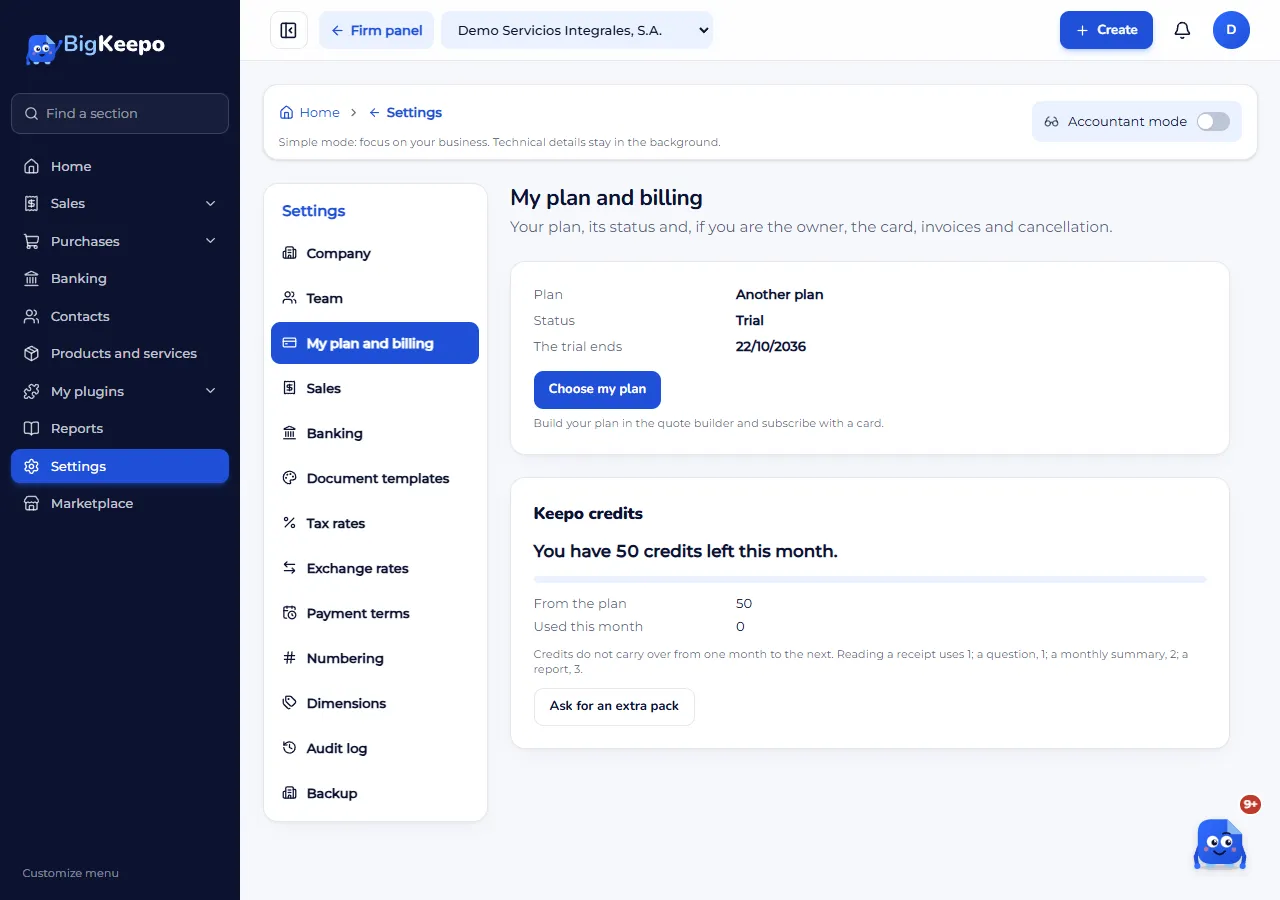
Review the lines: From the plan (the ones your plan brings), From extra packs (only if you have any) and Used this month. If your plan has no cap, it says "Your plan has no credit cap" and how many you used. In MiniKeepo, each app shows "X of Y left".
Read the note below: plan credits do not carry over from one month to the next; pack credits are valid for 30 days from purchase. Reading a receipt uses 1; a question, 1; a monthly summary, 2; a report, 3.
To read a receipt with Keepo, when you add an expense in KeepoShare, choose By line under How to split and select Take photo or Gallery. If the phone's reading does not match the total, Read with Keepo (AI) appears, and below it, how many readings you have left. Review the lines before saving.
If you need more credits, select Ask for an extra pack. Write to support opens: tell us what you need and select Send. The BigKeepo team replies on the same screen.
Expected result
You know how many credits you have left and which action uses them. A credit is deducted only when the answer comes out right: if Keepo cannot read the photo, the credit is not charged.
If something goes wrong
It says "You used your Keepo credits this month. You can keep going without AI.": credits come back next month, or ask for an extra pack. Meanwhile, fill in the lines by hand.
It says "We could not read this photo today. Try a clearer one or fill in the lines by hand.": take another photo with good light, straight on and complete.
It says "Review these lines: they do not add up to the total.": Keepo read the receipt, but it does not match. Correct the lines before saving.
You do not see the Keepo credits card: your plan does not include credits and you have no packs. Ask for a pack through Write to support.
You do not see the Read with Keepo (AI) button: it appears only after you take the photo and only if the phone's reading did not match.
Related articles
Was this helpful?