
Help topics
Payment methods and payments by method
Add Zelle, Yappy or another method to an account to choose it when you receive payment, and see what you received by method each month.
What it is for
A method is how you get paid or how you pay from an account: Yappy, Zelle, ACH and others. Once added, when you record a payment you choose it with one tap under How did they pay you?.
Add a method to an account
Open Banking and go into the account.
Under Linked payment methods, select Add method.
Choose the Type and enter the Name shown when receiving, for example «Company Zelle».
In Detail for the customer (number or email) enter what your customer needs to pay you. It appears on the invoice, under How to pay.
Check Show when receiving, Show when paying or both, and select Save.
To remove a method without losing its history, select Archive; Activate brings it back.
When a partner receives payment in their personal account
If a partner receives payments for the company in their personal account, record it in Settings › Banking, under Payments received by partners: select Add method, choose the Partner and the Name shown when collecting. The detail you enter is seen only by your team. When you receive payment, that method appears as «(partner)» and the money is left to be moved to the company.
See what you received by method
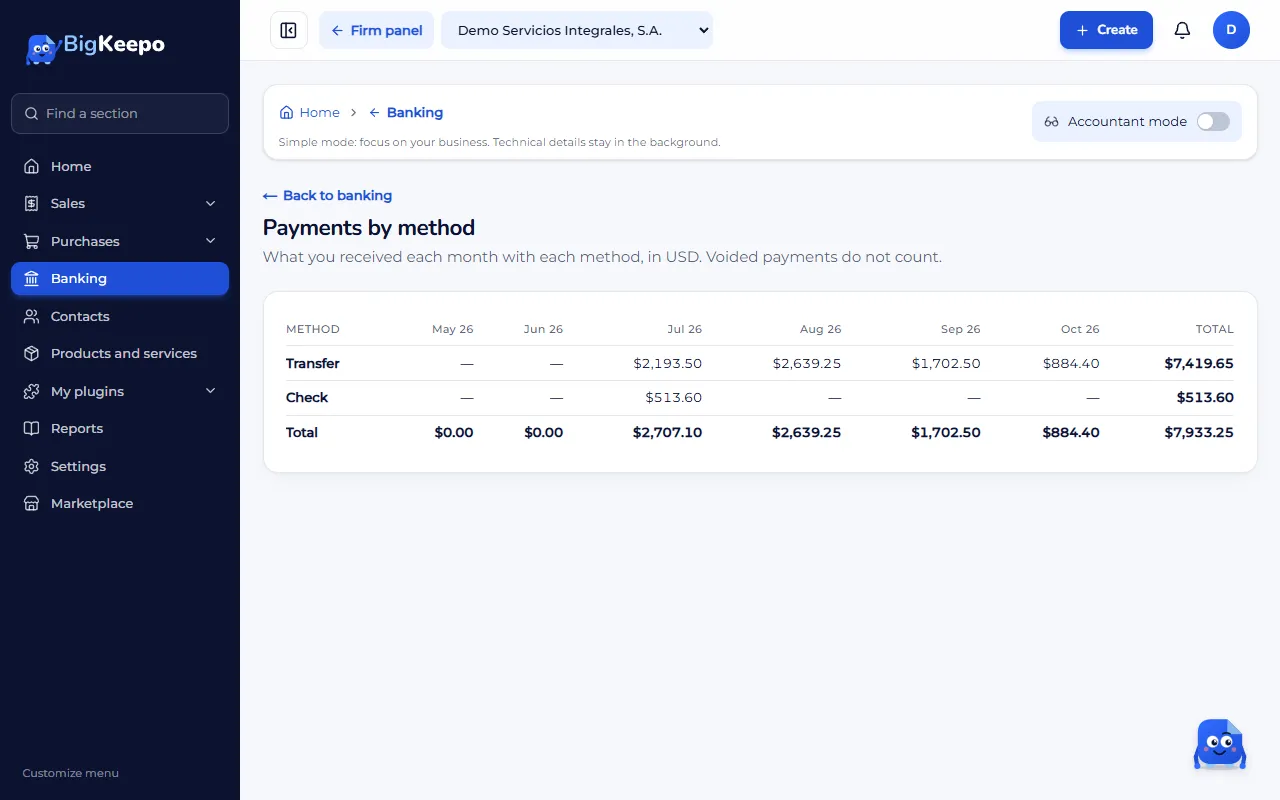
Open Banking and go into Payments by method. It shows what you received each month with each method. Voided payments do not count.
If something goes wrong
The method does not appear when you receive payment: check that it is not archived and that Show when receiving is checked.
It says there are no payments in these months: you have not recorded payments yet. See Record a customer payment.
Related articles
Was this helpful?