
Help topics
Manage your finances with KeepoPocket
Set up your budget, record what you spend and see how much you have left for today, in MiniKeepo.
What it is for
KeepoPocket is your personal finance space in MiniKeepo. It tells you how much you can spend today without doing the math, and shows you where your money goes. It is personal: it does not mix with any company's books.
Before you start
Sign in to MiniKeepo with your account. Each app has a free part and a Premium part: on the screen you will see What Premium includes.
Set it up in a minute
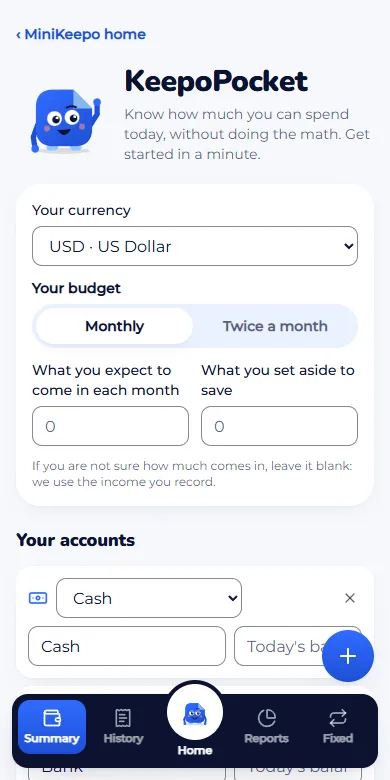
In MiniKeepo, open KeepoPocket. The first time you will see the setup.
Choose Your currency and Your budget: Monthly or Twice a month.
Enter what you expect to come in each month (or half-month) and what you set aside to save. If you are not sure how much comes in, leave it blank: we use the income you record.
Under Your accounts, keep Cash and Bank with their Today's balance, or click Add another account.
Click Get started.
Record a transaction
Click Add.
Under Transaction type, choose Expense, Income or Transfer.
Enter the amount with the keypad, then choose the Category and the Account.
Choose the Date (Today, Yesterday or Other date). If it was in another currency, check It was in another currency and enter the Rate.
Click Save, or Save and add another to keep recording.
Expected result
The home screen shows Left to spend today, what you have left for the days of the period, your pace compared with the ideal and Where it goes. From there you can also reach Your limits and Your goals.
If something goes wrong
It says "Enter what you expect to come in": without that figure we cannot work out what you can spend each day. Fill it in during setup.
It says you are over plan: it is a notice, not an error. A day without spending helps you get back on pace.
Related articles
Was this helpful?