
Help topics
Split expenses with KeepoShare
Create a group, record who paid what and see who owes whom, in MiniKeepo.
What it is for
KeepoShare keeps track of the expenses you share with other people: a trip, the house or a night out. Each person records what they paid and KeepoShare works out who pays whom. KeepoShare does not move money: it only keeps the count.
Before you start
Sign in to MiniKeepo with your account, which is free. Each MiniKeepo app has a free part and a Premium part: on the screen you will see What Premium includes.
Steps
In MiniKeepo, open KeepoShare. If you have no groups yet, you will see "No groups yet".
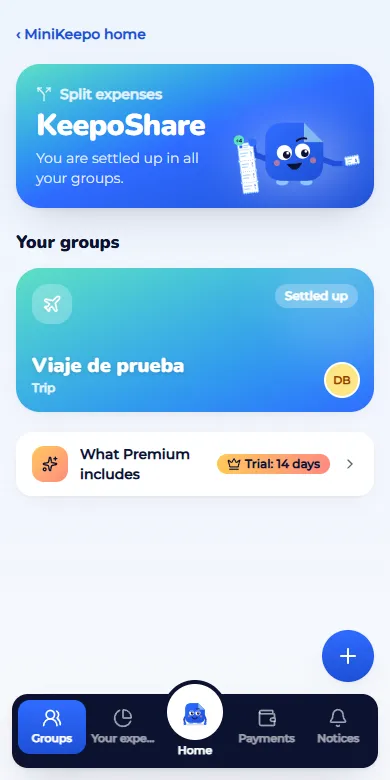
Click New group or event.
Enter the Name, choose the Type (Home, Couple, Friends, Trip, Event or Other) and the Currency. For a trip or an event you can add its dates.
Under With whom, add each person with their Name. The Email (optional) is used to invite them.
Click Create.
In the group, click Add expense. Enter the Amount, the Description and who Paid by. Each group chooses who can apply payments (record, correct or void): anyone in the group, or only who pays, who receives and the admins. It is chosen when the group is created and changed in Settings; changing it does not change payments already made. If someone tries to record a payment identical to a recent one (same pair, amount and currency), the app warns and does not save it until you confirm with It's another payment.
Under How to split, choose Equally, Amounts, Percentages, Shares or By line, and check Among whom. When the split adds up, you will see Matches the total.
Click Save expense.
Settle up
In the group, Who pays whom shows the payments that leave everyone even. When someone pays, click Record payment, fill in Who paid, To whom and Amount, and click Mark as paid. It is only a record of the payment they already made.
Trips with several currencies
The group has a main currency (the one you chose when creating it) and every balance is worked out in it. You can record an expense in another currency: KeepoShare converts it when saving and keeps the original amount, currency and rate. It never adds different currencies together without converting them.
In Settings, open Group rates and type the rate of each currency you will use: "1 ARS = 0.001 USD". Anyone in the group can do it and it is kept in the history. If there is no group rate, KeepoShare uses the official rate of the day (if it is under 7 days old) or asks you to type it.
When you Add expense in another currency, you will see the rate that will be used. You can change it; the expense is saved with the one you see.
Each group settles up with one method only, so everyone pays the same thing: Offset (fewer payments; the usual one) or By detail (each expense is settled separately). It is chosen when the group is created and whoever manages it can change it in Settings, under How the group settles up; it does not change the balances or what was already paid. In Who pays whom you can look at both views: the group's method has a check mark and the Settle button; the other one is for viewing only.
With See in, look at the balances in another currency. It is for viewing only: nothing saved changes.
To settle, click Record payment and choose Pay in the currency that suits you. Type or confirm the agreed Rate and check the preview: "Pays ARS 33,000.00, equal to USD 30.00".
Payments already made are under Recorded payments, with who recorded them and when. Click one to see its detail and history. Anyone in the group can correct it: nothing is deleted, the earlier version stays in the history and whoever receives the payment gets a notice. You can also Void a payment with an optional reason: it stops counting in the balances and stays visible.
An example: three friends in a group in USD. Ana paid the hotel (USD 300), Juan the barbecue (ARS 150,000, at 1 ARS = 0.001 USD that is USD 150) and Beto Rio (BRL 450, at 1 BRL = 0.20 USD that is USD 90). Each owes USD 180. Balances: Ana +120, Beto −90, Juan −30. If Juan pays in pesos at 1 USD = 1,100 ARS, he hands over ARS 33,000 and USD 30 is settled in the group; if Beto pays in reais at 5.50, he hands over BRL 495 and USD 90 is settled. "See in ARS" at 1,100 shows Ana +132,000, Beto −99,000 and Juan −33,000.
What changes when you settle at another rate: the payment keeps the rate as agreed and it is not recalculated. If the payment rate differs from the one on the expenses, the exchange difference is absorbed by whoever receives the payment. Changing a group rate later does not change expenses or payments already saved. If you type a rate that differs a lot from the suggested one, tick I confirm the rate.
Hide groups that are settled up
When you're settled up in a group, you can take it off your home. Only you stop seeing it; everyone else still does.
On your KeepoShare home, swipe the card to the left and tap Hide. If you'd rather not swipe, use the ⋯ button on the card and Hide this group. It's also in the group's Settings.
“Group hidden” appears with Undo for a few seconds.
Hidden groups sit at the bottom, under More groups. Open one as usual, or tap Show (or swipe the card to the right) to put it back on your home.
If you have a pending balance in a group, it can't be hidden. A hidden group comes back on its own when there is new activity (an expense, a payment or an invitation) or when a balance appears. A group that is settled up with no activity for more than 14 days moves to More groups on its own. “With each person”, your expenses and the notices still count all your groups. Under Your home (KeepoShare notices) you can turn off “Hide automatically” or change the days without activity (3 to 365). In a group's Settings, Always show this group keeps it from moving to “More groups” on its own.
Understand your balance
Tap How is this calculated? next to your balance (or the question mark on a person in “Balances”). You will see a table with every expense and payment in order: who paid, the total, your share, the effect (+ you are owed, − you owe) and the running total. The last line is your balance and always matches the one shown in the group. Voided entries do not count.
Expected result
Under Balances each person sees what they owe or are owed, and the group reaches Everyone is settled up.
If something goes wrong
It says "left to split" or "Over by": the split does not add up to the total. Adjust the amounts until you see Matches the total.
It says the rate is unclear: you wrote something like "1.100". Write it without a thousands separator, for example 1100 or 1100.50.
It asks for the official rate: there is no rate from the last 7 days. Type the agreed one or set the group rate in Settings.
An expense was recorded by mistake: open it and click Void.
Related articles
Was this helpful?