
Help topics
Add products and services
Create what you sell, with its price and its income account, to choose it when you make an invoice.
What it is for
Products and services is your catalog. Each one carries its price and the account where the income is recorded, so when you invoice you only choose it.
Before you start
Have your chart of accounts chosen: you need an income account. If you have not done it, see Set up your company.
Steps
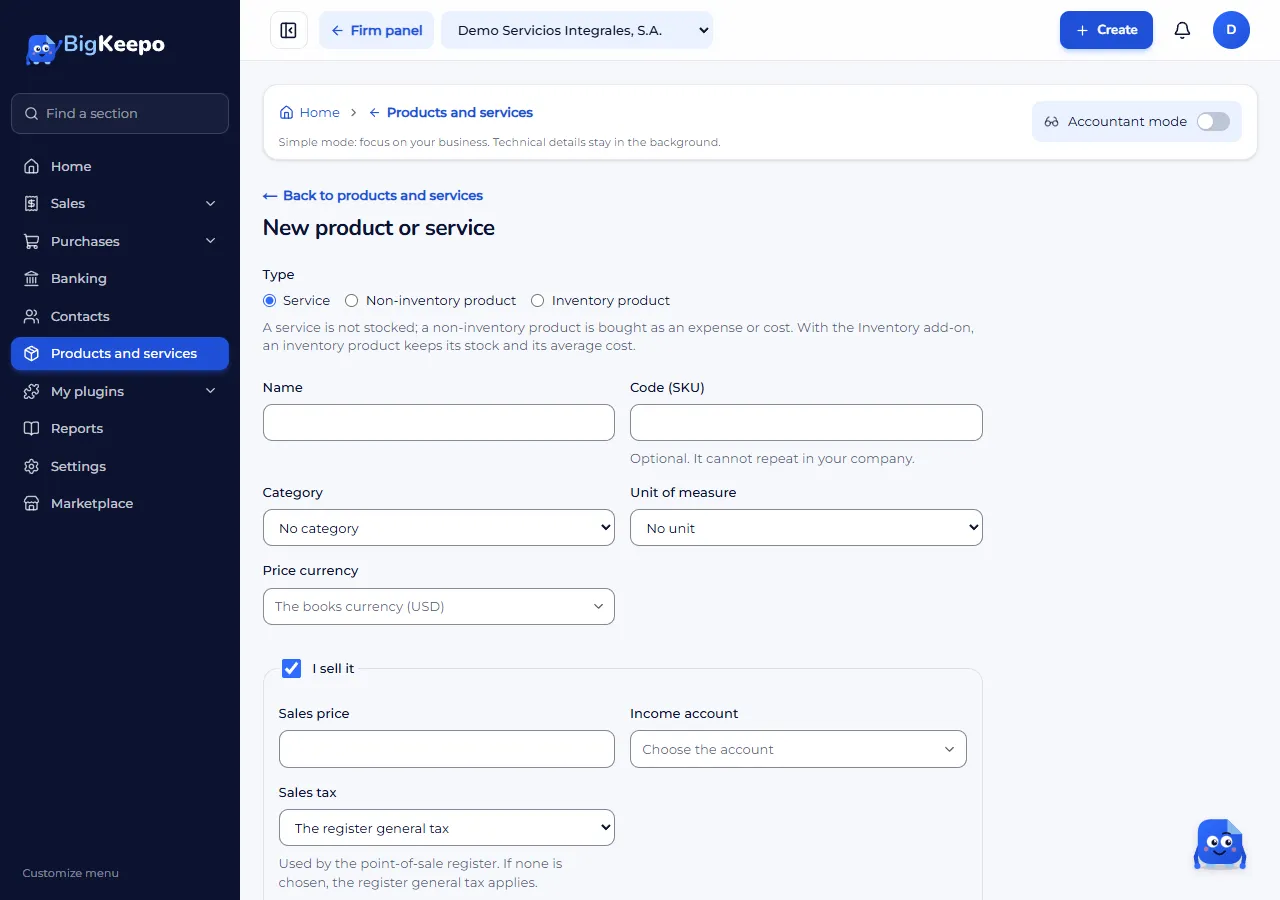
In the menu, open Products and services and select New product or service.
In Type, choose:
Service: it is not kept in stock.
Non-inventory product: it is bought as an expense or cost.
Inventory product: it keeps stock and average cost. It needs the Inventory add-on.
Enter the Name. The Code (SKU) is optional and cannot repeat.
With I sell it checked, enter the Sales price, choose the Income account and, if needed, the Sales tax.
If you also buy it, check I buy it and fill in the Purchase cost and the Expense or asset account.
Select Create.
Expected result
The product appears in the list. When you make an invoice or a quote, you choose it on each line and the price fills in on its own.
Change or deactivate
Select Edit on its page. Deactivate removes it from the lists without deleting the invoices where it was used; Reactivate brings it back.
If something goes wrong
You cannot find the income account: you still need to choose your chart of accounts.
You cannot choose «Inventory product»: that type needs the Inventory add-on.
Related articles
Was this helpful?